Start with their message.
Paste what they said or add a screenshot. Include a little context if there’s more to the story.
 Spark.
A LITTLE HELP WITH WHAT COMES NEXT
Make them blush!
Found the words you want to reply to, but not the words to send? Spark helps you find a reply that feels like you.
Sign in for 2 free tries. Three reply suggestions each.
For adults 18+ · Android phones
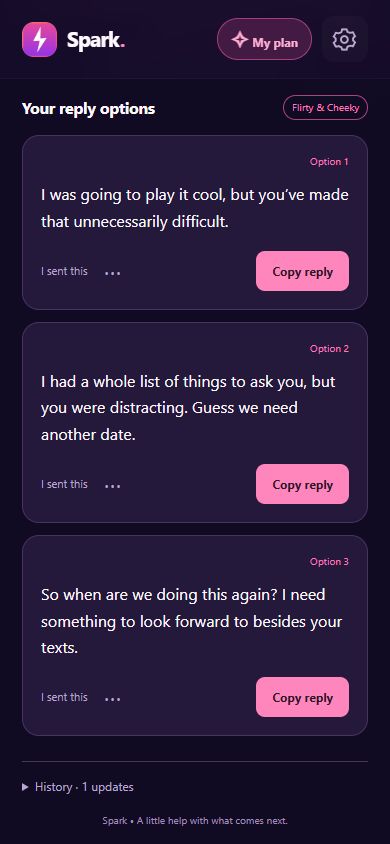
Inside Spark · example conversation
View full-size screenshot
FROM THEIR MESSAGE TO YOUR REPLY
A little context. The right tone. A reply you can make your own.
Paste what they said or add a screenshot. Include a little context if there’s more to the story.
Choose a tone, from Sweet & Genuine to Flirty & Cheeky. Pick a goal: keep talking, get to know them, or suggest meeting up.
Get three suggestions. Edit your favourite, copy it, and send it in your messaging app. You decide what gets sent.
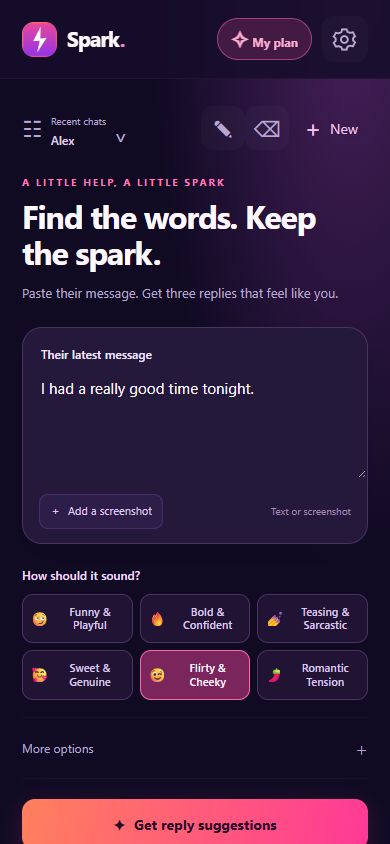
Your message. Your mood. Your next move.
View full-size screenshot
BUILT AROUND YOUR CONVERSATIONS
Compare three reply suggestions instead of feeling stuck with the first thing that comes to mind.
Save conversations, add notes, and record what you sent. Revisit the latest ten history updates and load older ones when you need them.
Edit a suggestion or regenerate the latest replies. Flag and hide a reply if it isn’t right for you.
A LITTLE SPARK TO START
Sign in to try Spark for free. Your first two tries give you a chance to see what fits your style.
Three reply suggestions per try.
No automatic subscription when you use your free tries. Your remaining tries stay linked to your account when you sign out.
After your free tries, subscribe through Google Play to continue. Spark Plus includes up to 300 generations per calendar month. See current prices and purchase terms in the app.
A FEW THINGS TO KNOW
Spark runs in the Android app on your phone. This website explains the app and provides privacy and support information. There is no browser version or iPhone app available here.
Yes. Sign in or create an account in the app before using your two free tries or buying a subscription. You can use email and password or Google sign-in.
No. Spark suggests replies. You can edit and copy one, then send it yourself in your messaging app. Always review suggestions before sending them; AI can misunderstand context.
Your saved chat history stays on your phone. When you request replies, the submitted message, relevant context and any attached screenshot are sent to Spark’s service and Google Gemini for generation. Read the privacy policy for details.
You’ll need an active subscription to continue generating replies. Signing out and back into the same account doesn’t reset your free tries. You can view your remaining allowance and subscription options in My plan.
Manage or cancel your subscription in Google Play. To delete your Spark account, use Settings → Delete account in the app, or follow our account-deletion instructions. Deleting your account does not cancel your subscription.
YOUR NEXT REPLY STARTS HERE
Open Spark on your Android phone, sign in, and try your first two generations for free.
View Spark on Google PlayAndroid phones · Adults 18+ · In-app purchases